> ## Documentation Index
> Fetch the complete documentation index at: https://docs.depict.ai/llms.txt
> Use this file to discover all available pages before exploring further.
# Products
> Browse your catalog with performance metrics, manage stock-based visibility and edit product imagery.
The Products page is your catalog, ranked and measured.
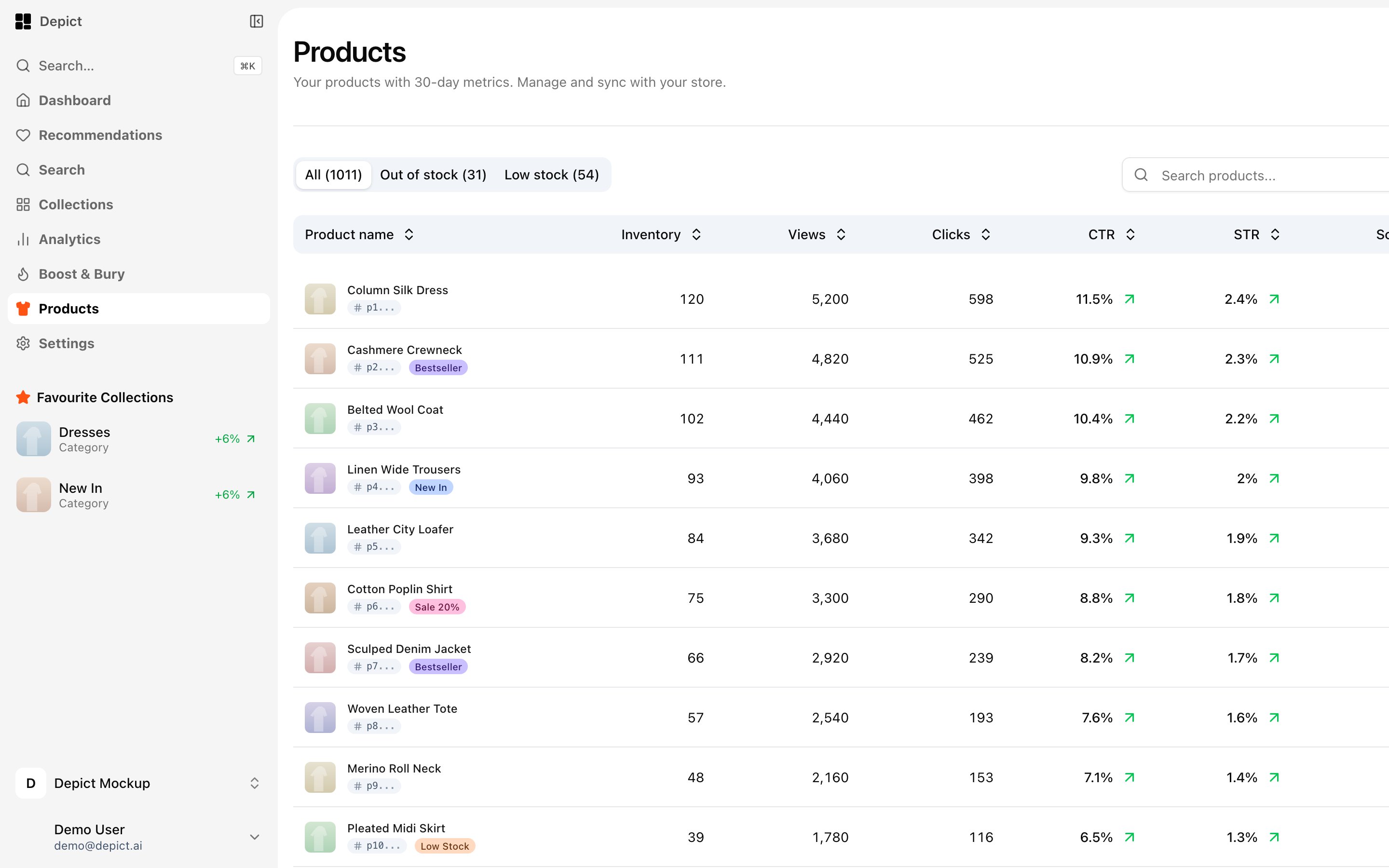 ## Catalog table
* Infinite-scrolling, sortable table with per-product metrics: inventory,
views, clicks, CTR, STR, orders and revenue — each compared to the previous
period.
* **Stock tabs**: All / Out of stock / Low stock, with live product counts.
* Text search plus attribute filters (checkbox, range and radio filters, with
clear-all).
* Trigger a **catalog sync** from the page header when you've changed data at
the source.
## Auto-hide for out-of-stock products
In the Out of stock view, enable **Auto-hide** to automatically hide
out-of-stock products across your storefront. Individual products can be
excluded from auto-hiding when you want them to stay visible (for example,
items about to restock).
## Product details
Open any product for a detail view with previous/next navigation:
* **Overview** — last-30-day metrics versus the previous period, weekly
stats, toplist ranking and a weekly views/clicks/revenue chart, optionally
scoped by market group.
* **Details** — description, categories, status, per-variant price and
inventory, plus a **visibility matrix**: show or hide the product per market
group across the three surfaces (listing pages, search, recommendations).
* **Images** — reorder product images with drag-and-drop.
Some capabilities (the Overview metrics tab and market-group filtering) roll
out gradually per merchant. If you don't see them, contact
[support](mailto:hello@depict.ai).
## Catalog table
* Infinite-scrolling, sortable table with per-product metrics: inventory,
views, clicks, CTR, STR, orders and revenue — each compared to the previous
period.
* **Stock tabs**: All / Out of stock / Low stock, with live product counts.
* Text search plus attribute filters (checkbox, range and radio filters, with
clear-all).
* Trigger a **catalog sync** from the page header when you've changed data at
the source.
## Auto-hide for out-of-stock products
In the Out of stock view, enable **Auto-hide** to automatically hide
out-of-stock products across your storefront. Individual products can be
excluded from auto-hiding when you want them to stay visible (for example,
items about to restock).
## Product details
Open any product for a detail view with previous/next navigation:
* **Overview** — last-30-day metrics versus the previous period, weekly
stats, toplist ranking and a weekly views/clicks/revenue chart, optionally
scoped by market group.
* **Details** — description, categories, status, per-variant price and
inventory, plus a **visibility matrix**: show or hide the product per market
group across the three surfaces (listing pages, search, recommendations).
* **Images** — reorder product images with drag-and-drop.
Some capabilities (the Overview metrics tab and market-group filtering) roll
out gradually per merchant. If you don't see them, contact
[support](mailto:hello@depict.ai).