> ## Documentation Index
> Fetch the complete documentation index at: https://docs.depict.ai/llms.txt
> Use this file to discover all available pages before exploring further.
# Adding a way to open the Search Modal
This page does not apply to installs made in 2025 or later of the Depict Shopify apps
The search modal is what's used to make a search and get to the results page. You need to add a way for the user to open the modal.
There are three ways to do this:
Remove any event listeners from your existing search button so that nothing happens when clicking it
Add the `open-depict-search` class to your search button to make it open the Depict search modal.
Clicking the search button should now open the Depict search modal.
Add a search button block in the theme editor (Or manually add `` in your theme)
 {
// In prod, they have some zoom thing which breaks aspectRatio, work around that. Unfortunately this is not in the SSR'd output so there's still some CLS.
const direct_parent = element?.parentElement;
if(direct_parent?.matches?.("[data-rmiz-content]")) {
Object.assign(direct_parent.style, {
width: "100%",
display: "flex",
justifyContent: "center",
alignItems: "center"
})
}
const parents_parent = direct_parent?.parentElement;
if(parents_parent?.matches?.("[aria-owns^='rmiz-modal']")) {
parents_parent.style.width = "100%";
}
}}
/>
Style the button using the style editor in the Depict app configuration interface.
Clicking the search button should now open the Depict search modal.
If you prefer a visible search field in your header instead of just a button, there is a "Depict Search Field" block that you can use which will automatically align and connect to the modal.
Add a search field block in the theme editor (Or manually add `` in your theme)
{
// In prod, they have some zoom thing which breaks aspectRatio, work around that. Unfortunately this is not in the SSR'd output so there's still some CLS.
const direct_parent = element?.parentElement;
if(direct_parent?.matches?.("[data-rmiz-content]")) {
Object.assign(direct_parent.style, {
width: "100%",
display: "flex",
justifyContent: "center",
alignItems: "center"
})
}
const parents_parent = direct_parent?.parentElement;
if(parents_parent?.matches?.("[aria-owns^='rmiz-modal']")) {
parents_parent.style.width = "100%";
}
}}
/>
Style the button using the style editor in the Depict app configuration interface.
Clicking the search button should now open the Depict search modal.
If you prefer a visible search field in your header instead of just a button, there is a "Depict Search Field" block that you can use which will automatically align and connect to the modal.
Add a search field block in the theme editor (Or manually add `` in your theme)
 {
// In prod, they have some zoom thing which breaks aspectRatio, work around that. Unfortunately this is not in the SSR'd output so there's still some CLS.
const direct_parent = element?.parentElement;
if(direct_parent?.matches?.("[data-rmiz-content]")) {
Object.assign(direct_parent.style, {
width: "100%",
display: "flex",
justifyContent: "center",
alignItems: "center"
})
}
const parents_parent = direct_parent?.parentElement;
if(parents_parent?.matches?.("[aria-owns^='rmiz-modal']")) {
parents_parent.style.width = "100%";
}
}}
/>
You now have a search field that will open the Depict search modal, aligned to it, as you can see in the following screenshots.
{
// In prod, they have some zoom thing which breaks aspectRatio, work around that. Unfortunately this is not in the SSR'd output so there's still some CLS.
const direct_parent = element?.parentElement;
if(direct_parent?.matches?.("[data-rmiz-content]")) {
Object.assign(direct_parent.style, {
width: "100%",
display: "flex",
justifyContent: "center",
alignItems: "center"
})
}
const parents_parent = direct_parent?.parentElement;
if(parents_parent?.matches?.("[aria-owns^='rmiz-modal']")) {
parents_parent.style.width = "100%";
}
}}
/>
You now have a search field that will open the Depict search modal, aligned to it, as you can see in the following screenshots.
 {
// In prod, they have some zoom thing which breaks aspectRatio, work around that. Unfortunately this is not in the SSR'd output so there's still some CLS.
const direct_parent = element?.parentElement;
if(direct_parent?.matches?.("[data-rmiz-content]")) {
Object.assign(direct_parent.style, {
width: "100%",
display: "flex",
justifyContent: "center",
alignItems: "center"
})
}
const parents_parent = direct_parent?.parentElement;
if(parents_parent?.matches?.("[aria-owns^='rmiz-modal']")) {
parents_parent.style.width = "100%";
}
}}
/>
{
// In prod, they have some zoom thing which breaks aspectRatio, work around that. Unfortunately this is not in the SSR'd output so there's still some CLS.
const direct_parent = element?.parentElement;
if(direct_parent?.matches?.("[data-rmiz-content]")) {
Object.assign(direct_parent.style, {
width: "100%",
display: "flex",
justifyContent: "center",
alignItems: "center"
})
}
const parents_parent = direct_parent?.parentElement;
if(parents_parent?.matches?.("[aria-owns^='rmiz-modal']")) {
parents_parent.style.width = "100%";
}
}}
/>
 {
// In prod, they have some zoom thing which breaks aspectRatio, work around that. Unfortunately this is not in the SSR'd output so there's still some CLS.
const direct_parent = element?.parentElement;
if(direct_parent?.matches?.("[data-rmiz-content]")) {
Object.assign(direct_parent.style, {
width: "100%",
display: "flex",
justifyContent: "center",
alignItems: "center"
})
}
const parents_parent = direct_parent?.parentElement;
if(parents_parent?.matches?.("[aria-owns^='rmiz-modal']")) {
parents_parent.style.width = "100%";
}
}}
/>
Now that you have added the Depict search to your site, we recommend removing all traces (including JavaScript) of your old search to improve pagespeed.
## Optional: Alignment options
When using the search field, the modal will automatically align to the SearchField (landscape modal) or align to it initially and then animate the X-direction to be centered (portrait modal).
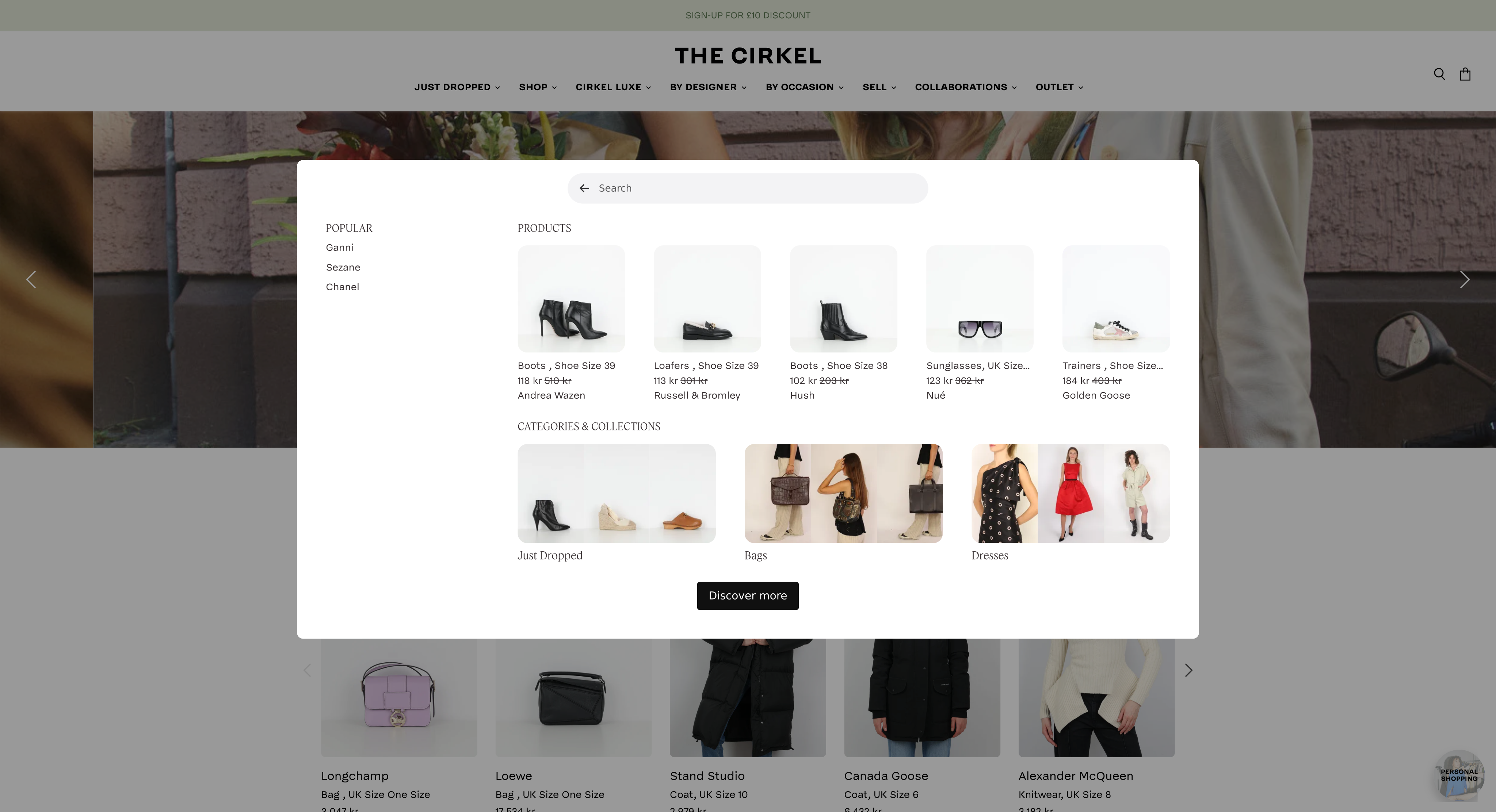
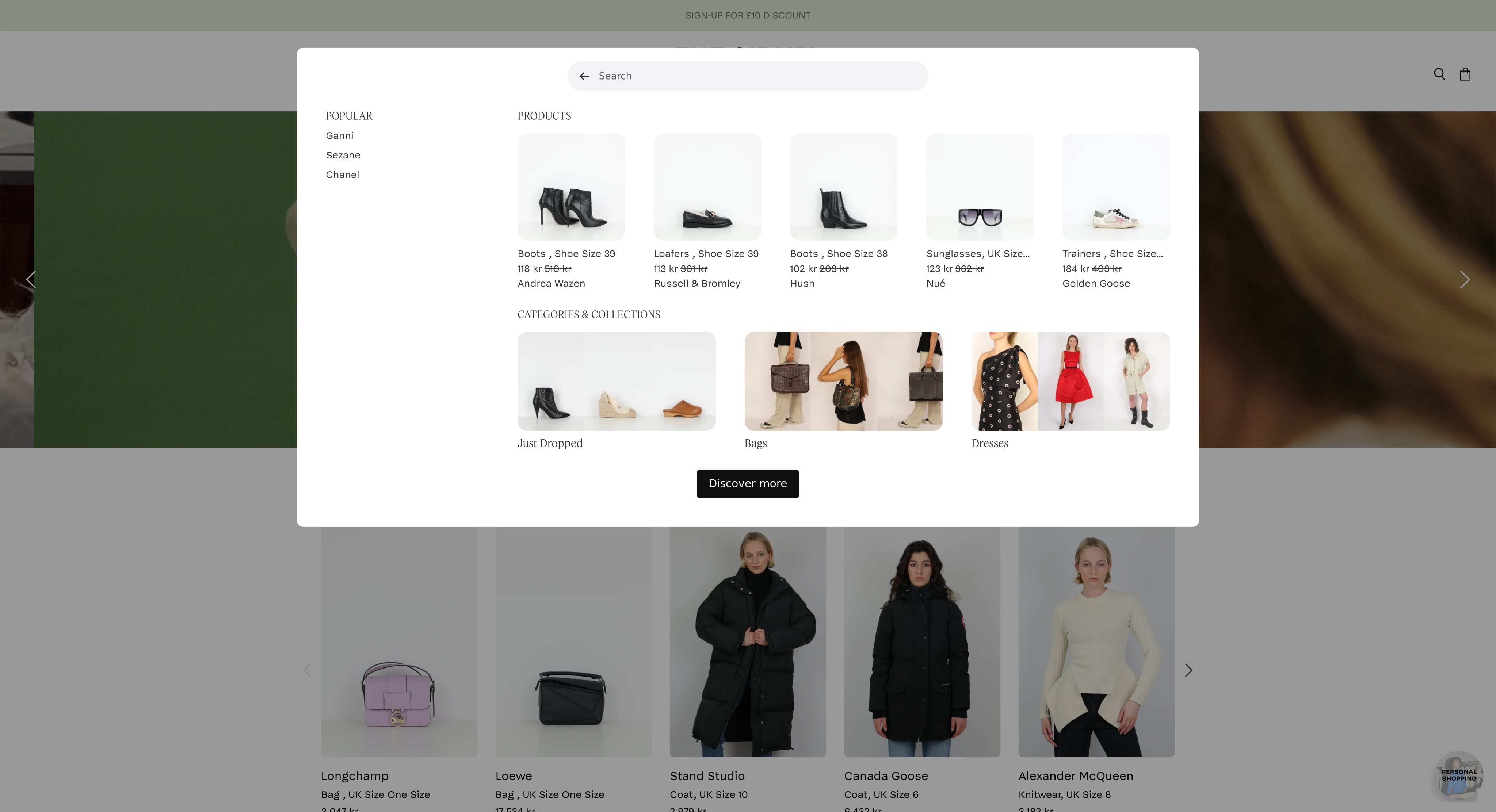
When using a search button, there are two different alignment modes available, provided you're using the landscape search modal:
{
// In prod, they have some zoom thing which breaks aspectRatio, work around that. Unfortunately this is not in the SSR'd output so there's still some CLS.
const direct_parent = element?.parentElement;
if(direct_parent?.matches?.("[data-rmiz-content]")) {
Object.assign(direct_parent.style, {
width: "100%",
display: "flex",
justifyContent: "center",
alignItems: "center"
})
}
const parents_parent = direct_parent?.parentElement;
if(parents_parent?.matches?.("[aria-owns^='rmiz-modal']")) {
parents_parent.style.width = "100%";
}
}}
/>
Now that you have added the Depict search to your site, we recommend removing all traces (including JavaScript) of your old search to improve pagespeed.
## Optional: Alignment options
When using the search field, the modal will automatically align to the SearchField (landscape modal) or align to it initially and then animate the X-direction to be centered (portrait modal).
When using a search button, there are two different alignment modes available, provided you're using the landscape search modal:
 {
// In prod, they have some zoom thing which breaks aspectRatio, work around that. Unfortunately this is not in the SSR'd output so there's still some CLS.
const direct_parent = element?.parentElement;
if(direct_parent?.matches?.("[data-rmiz-content]")) {
Object.assign(direct_parent.style, {
width: "100%",
display: "flex",
justifyContent: "center",
alignItems: "center"
})
}
const parents_parent = direct_parent?.parentElement;
if(parents_parent?.matches?.("[aria-owns^='rmiz-modal']")) {
parents_parent.style.width = "100%";
}
}}
/>
{
// In prod, they have some zoom thing which breaks aspectRatio, work around that. Unfortunately this is not in the SSR'd output so there's still some CLS.
const direct_parent = element?.parentElement;
if(direct_parent?.matches?.("[data-rmiz-content]")) {
Object.assign(direct_parent.style, {
width: "100%",
display: "flex",
justifyContent: "center",
alignItems: "center"
})
}
const parents_parent = direct_parent?.parentElement;
if(parents_parent?.matches?.("[aria-owns^='rmiz-modal']")) {
parents_parent.style.width = "100%";
}
}}
/>
 {
// In prod, they have some zoom thing which breaks aspectRatio, work around that. Unfortunately this is not in the SSR'd output so there's still some CLS.
const direct_parent = element?.parentElement;
if(direct_parent?.matches?.("[data-rmiz-content]")) {
Object.assign(direct_parent.style, {
width: "100%",
display: "flex",
justifyContent: "center",
alignItems: "center"
})
}
const parents_parent = direct_parent?.parentElement;
if(parents_parent?.matches?.("[aria-owns^='rmiz-modal']")) {
parents_parent.style.width = "100%";
}
}}
/>
{
// In prod, they have some zoom thing which breaks aspectRatio, work around that. Unfortunately this is not in the SSR'd output so there's still some CLS.
const direct_parent = element?.parentElement;
if(direct_parent?.matches?.("[data-rmiz-content]")) {
Object.assign(direct_parent.style, {
width: "100%",
display: "flex",
justifyContent: "center",
alignItems: "center"
})
}
const parents_parent = direct_parent?.parentElement;
if(parents_parent?.matches?.("[aria-owns^='rmiz-modal']")) {
parents_parent.style.width = "100%";
}
}}
/>
One advantage of aligning the modal to the button is that the position of the modal won't shift as the content in it changes.
### Enabling the vertically-aligned-to-button mode
1. When re-using your existing search button, add `data-align-to-self="true"` to the element.
2. When using the "Depict Search Button"-block, check the "enable button to modal in y-axis" box in the block settings
 {
// In prod, they have some zoom thing which breaks aspectRatio, work around that. Unfortunately this is not in the SSR'd output so there's still some CLS.
const direct_parent = element?.parentElement;
if(direct_parent?.matches?.("[data-rmiz-content]")) {
Object.assign(direct_parent.style, {
width: "100%",
display: "flex",
justifyContent: "center",
alignItems: "center"
})
}
const parents_parent = direct_parent?.parentElement;
if(parents_parent?.matches?.("[aria-owns^='rmiz-modal']")) {
parents_parent.style.width = "100%";
}
}}
/>
Please give us feedback if you want to align the modal to other, arbitrary DOM elements.
{
// In prod, they have some zoom thing which breaks aspectRatio, work around that. Unfortunately this is not in the SSR'd output so there's still some CLS.
const direct_parent = element?.parentElement;
if(direct_parent?.matches?.("[data-rmiz-content]")) {
Object.assign(direct_parent.style, {
width: "100%",
display: "flex",
justifyContent: "center",
alignItems: "center"
})
}
const parents_parent = direct_parent?.parentElement;
if(parents_parent?.matches?.("[aria-owns^='rmiz-modal']")) {
parents_parent.style.width = "100%";
}
}}
/>
Please give us feedback if you want to align the modal to other, arbitrary DOM elements.