> ## Documentation Index
> Fetch the complete documentation index at: https://docs.depict.ai/llms.txt
> Use this file to discover all available pages before exploring further.
# Adding a Search Page block
This page does not apply to installs made in 2025 or later of the Depict Shopify apps
Nex step is adding the search page block to your search page template. This is where users can view search results, filter and sort once they've pressed "enter" or "search" in the search modal.
If you want an overview of the search flow for a user, check out this page in the React UI guide
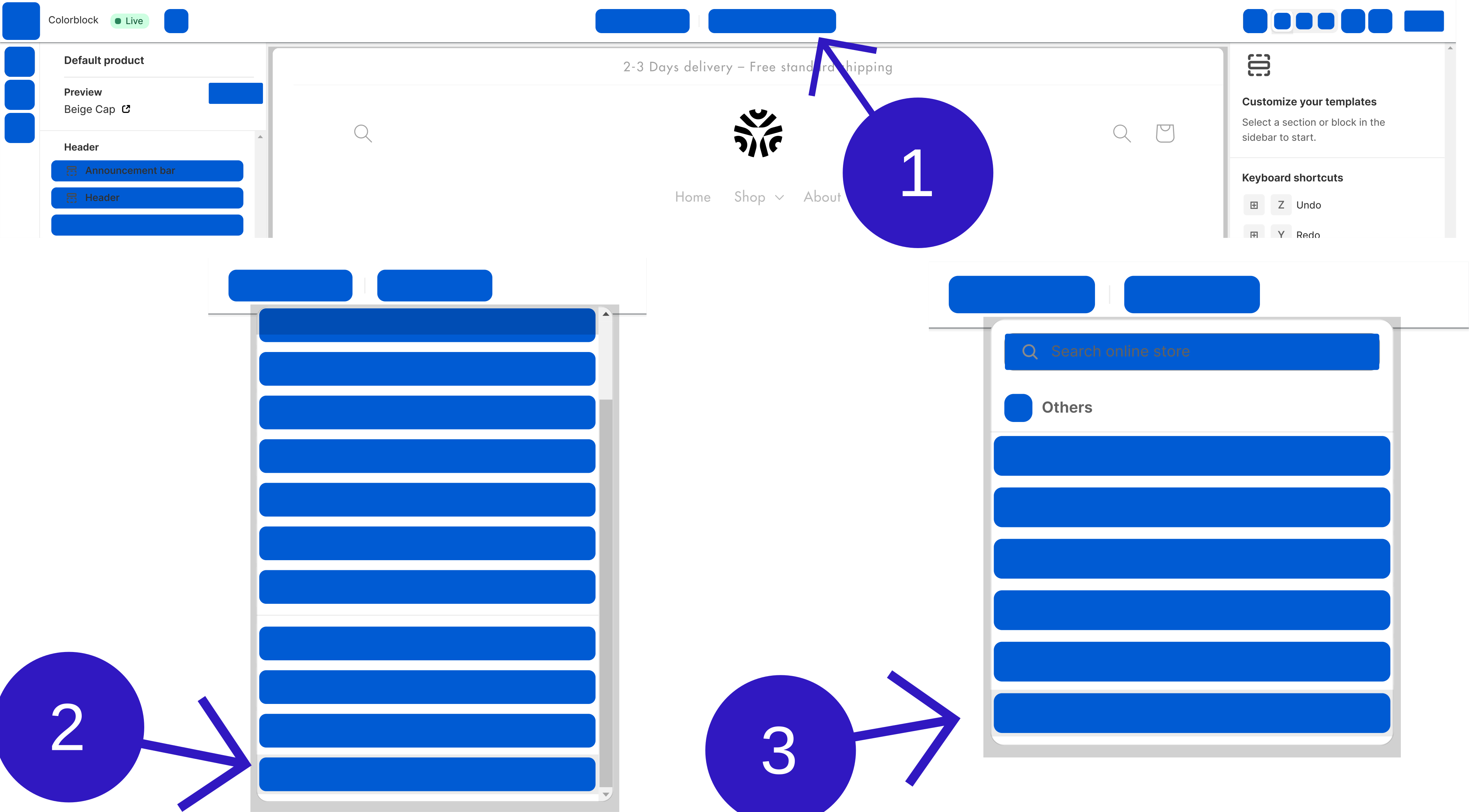
Select the search page template
{
// In prod, they have some zoom thing which breaks aspectRatio, work around that. Unfortunately this is not in the SSR'd output so there's still some CLS.
const direct_parent = element?.parentElement;
if(direct_parent?.matches?.("[data-rmiz-content]")) {
Object.assign(direct_parent.style, {
width: "100%",
display: "flex",
justifyContent: "center",
alignItems: "center"
})
}
const parents_parent = direct_parent?.parentElement;
if(parents_parent?.matches?.("[aria-owns^='rmiz-modal']")) {
parents_parent.style.width = "100%";
}
}}
/>
Add the Depict Search Page block to the search template.
You might also want to hide your old search results block in this step.
{
// In prod, they have some zoom thing which breaks aspectRatio, work around that. Unfortunately this is not in the SSR'd output so there's still some CLS.
const direct_parent = element?.parentElement;
if(direct_parent?.matches?.("[data-rmiz-content]")) {
Object.assign(direct_parent.style, {
width: "100%",
display: "flex",
justifyContent: "center",
alignItems: "center"
})
}
const parents_parent = direct_parent?.parentElement;
if(parents_parent?.matches?.("[aria-owns^='rmiz-modal']")) {
parents_parent.style.width = "100%";
}
}}
/>
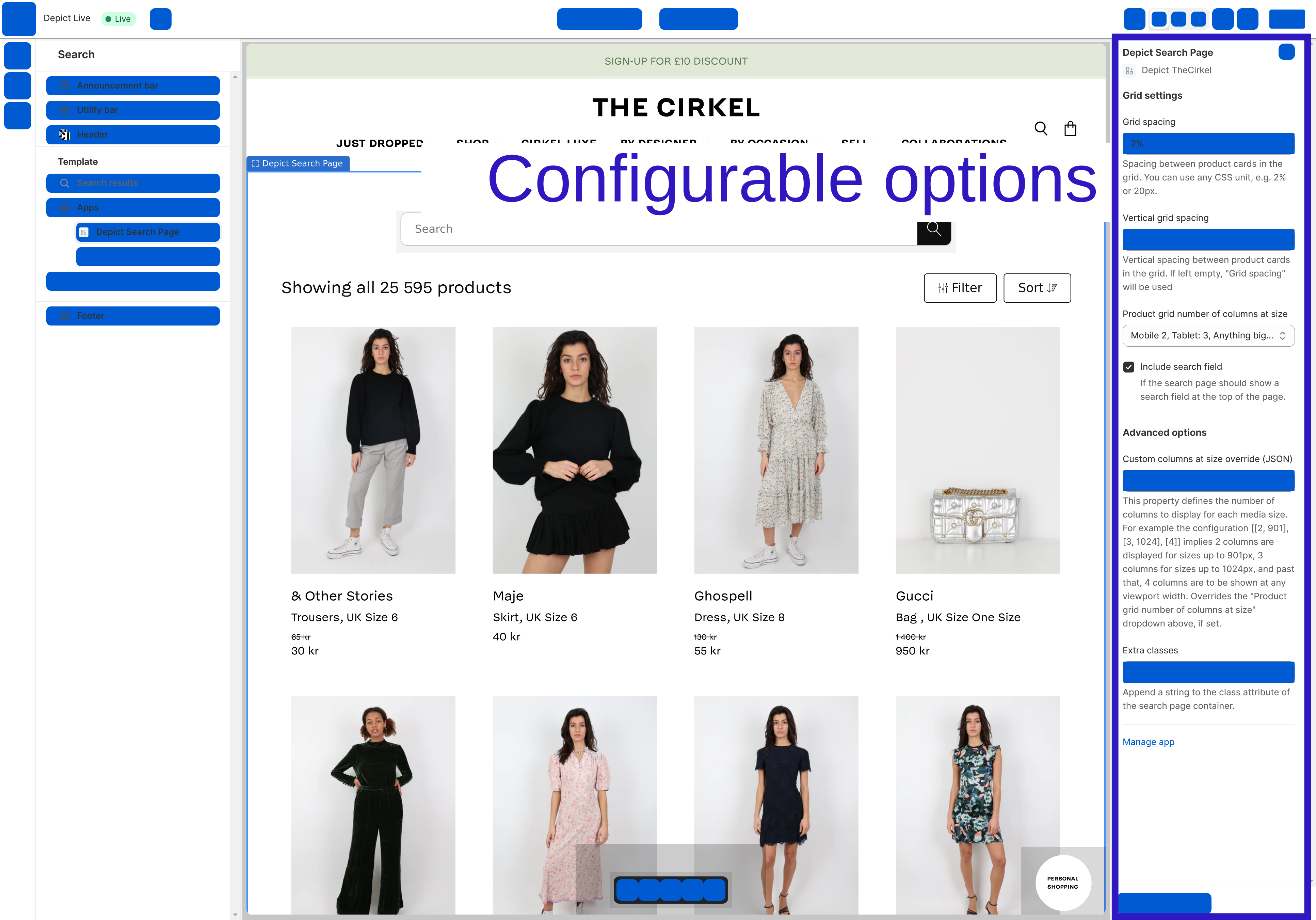
Change the configurable options as you like and hit save
{
// In prod, they have some zoom thing which breaks aspectRatio, work around that. Unfortunately this is not in the SSR'd output so there's still some CLS.
const direct_parent = element?.parentElement;
if(direct_parent?.matches?.("[data-rmiz-content]")) {
Object.assign(direct_parent.style, {
width: "100%",
display: "flex",
justifyContent: "center",
alignItems: "center"
})
}
const parents_parent = direct_parent?.parentElement;
if(parents_parent?.matches?.("[aria-owns^='rmiz-modal']")) {
parents_parent.style.width = "100%";
}
}}
/>
 {
// In prod, they have some zoom thing which breaks aspectRatio, work around that. Unfortunately this is not in the SSR'd output so there's still some CLS.
const direct_parent = element?.parentElement;
if(direct_parent?.matches?.("[data-rmiz-content]")) {
Object.assign(direct_parent.style, {
width: "100%",
display: "flex",
justifyContent: "center",
alignItems: "center"
})
}
const parents_parent = direct_parent?.parentElement;
if(parents_parent?.matches?.("[aria-owns^='rmiz-modal']")) {
parents_parent.style.width = "100%";
}
}}
/>
{
// In prod, they have some zoom thing which breaks aspectRatio, work around that. Unfortunately this is not in the SSR'd output so there's still some CLS.
const direct_parent = element?.parentElement;
if(direct_parent?.matches?.("[data-rmiz-content]")) {
Object.assign(direct_parent.style, {
width: "100%",
display: "flex",
justifyContent: "center",
alignItems: "center"
})
}
const parents_parent = direct_parent?.parentElement;
if(parents_parent?.matches?.("[aria-owns^='rmiz-modal']")) {
parents_parent.style.width = "100%";
}
}}
/>
 {
// In prod, they have some zoom thing which breaks aspectRatio, work around that. Unfortunately this is not in the SSR'd output so there's still some CLS.
const direct_parent = element?.parentElement;
if(direct_parent?.matches?.("[data-rmiz-content]")) {
Object.assign(direct_parent.style, {
width: "100%",
display: "flex",
justifyContent: "center",
alignItems: "center"
})
}
const parents_parent = direct_parent?.parentElement;
if(parents_parent?.matches?.("[aria-owns^='rmiz-modal']")) {
parents_parent.style.width = "100%";
}
}}
/>
{
// In prod, they have some zoom thing which breaks aspectRatio, work around that. Unfortunately this is not in the SSR'd output so there's still some CLS.
const direct_parent = element?.parentElement;
if(direct_parent?.matches?.("[data-rmiz-content]")) {
Object.assign(direct_parent.style, {
width: "100%",
display: "flex",
justifyContent: "center",
alignItems: "center"
})
}
const parents_parent = direct_parent?.parentElement;
if(parents_parent?.matches?.("[aria-owns^='rmiz-modal']")) {
parents_parent.style.width = "100%";
}
}}
/>
 {
// In prod, they have some zoom thing which breaks aspectRatio, work around that. Unfortunately this is not in the SSR'd output so there's still some CLS.
const direct_parent = element?.parentElement;
if(direct_parent?.matches?.("[data-rmiz-content]")) {
Object.assign(direct_parent.style, {
width: "100%",
display: "flex",
justifyContent: "center",
alignItems: "center"
})
}
const parents_parent = direct_parent?.parentElement;
if(parents_parent?.matches?.("[aria-owns^='rmiz-modal']")) {
parents_parent.style.width = "100%";
}
}}
/>
{
// In prod, they have some zoom thing which breaks aspectRatio, work around that. Unfortunately this is not in the SSR'd output so there's still some CLS.
const direct_parent = element?.parentElement;
if(direct_parent?.matches?.("[data-rmiz-content]")) {
Object.assign(direct_parent.style, {
width: "100%",
display: "flex",
justifyContent: "center",
alignItems: "center"
})
}
const parents_parent = direct_parent?.parentElement;
if(parents_parent?.matches?.("[aria-owns^='rmiz-modal']")) {
parents_parent.style.width = "100%";
}
}}
/>