> ## Documentation Index
> Fetch the complete documentation index at: https://docs.depict.ai/llms.txt
> Use this file to discover all available pages before exploring further.
# Settings
> The Settings page: plans and limits, badge thresholds, grid columns, market groups, catalog sync, and integrations.
The **Settings** page in the Supergrid app holds the store-wide
configuration: subscription and plan, the thresholds behind product badges,
grid appearance, market groups, catalog sync, and the Instagram connection.
In the embedded app, changes are saved with the Shopify save bar; in the
standalone portal they save automatically.
## Limits and behavior
* The free trial lasts 7 days with no limits. After it, the free tier allows
a maximum of 3 active collections.
* Paid plans are sized by monthly storefront sessions: Basic 50,000 ·
Essential 250,000 · Pro 500,000. Custom plans are sized individually.
* When a store without an active subscription exceeds its limits, editing is
frozen and a banner is shown — the configuration is kept, and picking a
plan unfreezes it.
* Saving Dynamic status re-sorts every active collection (badge-based rules
are recomputed against the new thresholds).
* The catalog syncs automatically, roughly every 3 hours. Deleting or
archiving a product in Shopify removes it from Depict on the next sync.
* The Stores section appears only on the Pro and Custom plans. The Market
Configuration and Collection Display sections appear only for stores with
multiple Shopify markets.
## Subscription
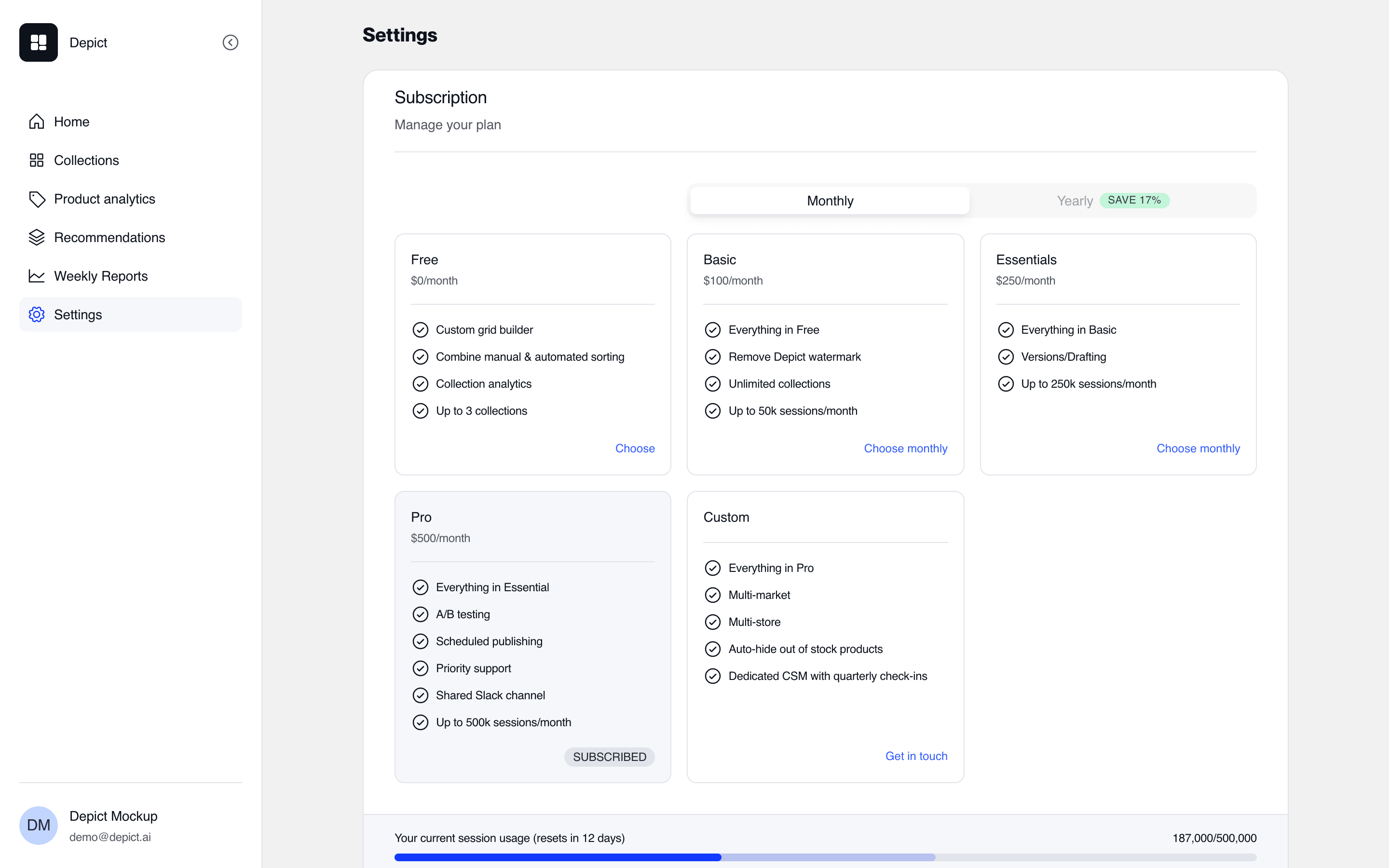 The Subscription section shows the current plan and the plan picker
(monthly or annual billing). Changing plans goes through Shopify's own
approval flow — the new subscription starts only after it is approved there.
What each tier unlocks:
| Capability | Requires |
| ---------------------------------------- | ------------------------ |
| More than 3 active collections | Any paid plan |
| Bulk actions on the Collections page | Any paid plan |
| Collection preview without a watermark | Any paid plan |
| Collection versions | Essential, Pro or Custom |
| Scheduled publishing | Pro or Custom |
| [A/B testing](/shopify-lite/ab-testing) | Pro or Custom |
| [Multi-store](/shopify-lite/multi-store) | Pro or Custom |
During the free trial, all capabilities are available.
## Dynamic status
Dynamic status defines which products carry the computed badges used by
[Boost & Bury rules](/shopify-lite/boost-and-bury) and shown in the editor:
| Threshold | Defines |
| ------------------------------------------------- | ------------------------------------ |
| Days since publish | **New in** |
| Number of top products, over an order-data window | **Bestseller** (by units or revenue) |
| Number of rising products | **Trending** (by units or revenue) |
| Number of low-sellthrough products | **Slow mover** |
| Share of variants left in stock | **Low on Stock** |
Saving Dynamic status triggers a re-sort of every active collection, since
badge-based sorting rules are recomputed against the new thresholds.
## Appearance
* **Desktop columns** and **Mobile columns** set the collection grid's column
counts (defaults: 4 desktop, 2 mobile). These are the column counts used in
content-card [slot placement](/shopify-lite/troubleshooting#empty-spaces-in-the-grid-when-using-content-cards).
* **Theme** (Light / Dark / System) controls the portal's own appearance,
not the storefront.
## Stores
Available on Pro and Custom. Lists the store's multi-store connections and
links to the connection editors. Connecting, mapping and replication are
documented on the [Multi-store](/shopify-lite/multi-store) page.
## Market Configuration
Shown for stores with multiple Shopify markets. Market groups bundle markets
so a single collection version can target all of them at once.
* A **Global** group containing every market is created automatically and is
always listed first.
* Create a group by naming it and selecting its markets.
* Groups can be enabled and disabled.
Disabling a market group that is used by active collection versions stops
data ingestion for those markets — the versions remain, but their metrics
stop updating. The app warns before you confirm.
## Collection Display
Shown for stores with multiple Shopify markets: a store-wide setting for
hiding out-of-stock products.
## Sync
Shows when the catalog was last synced from Shopify. Syncing is automatic
(roughly every 3 hours); a manual sync can be triggered from here when you
need a change reflected sooner.
## Instagram
Connect a Meta for Business account to import Instagram media into
content cards in the collection editor. The connection can be removed at any
time from the same section.
## Support
The Contact section opens a support ticket, and — once theme onboarding has
finished — offers booking a personal onboarding session.
The Subscription section shows the current plan and the plan picker
(monthly or annual billing). Changing plans goes through Shopify's own
approval flow — the new subscription starts only after it is approved there.
What each tier unlocks:
| Capability | Requires |
| ---------------------------------------- | ------------------------ |
| More than 3 active collections | Any paid plan |
| Bulk actions on the Collections page | Any paid plan |
| Collection preview without a watermark | Any paid plan |
| Collection versions | Essential, Pro or Custom |
| Scheduled publishing | Pro or Custom |
| [A/B testing](/shopify-lite/ab-testing) | Pro or Custom |
| [Multi-store](/shopify-lite/multi-store) | Pro or Custom |
During the free trial, all capabilities are available.
## Dynamic status
Dynamic status defines which products carry the computed badges used by
[Boost & Bury rules](/shopify-lite/boost-and-bury) and shown in the editor:
| Threshold | Defines |
| ------------------------------------------------- | ------------------------------------ |
| Days since publish | **New in** |
| Number of top products, over an order-data window | **Bestseller** (by units or revenue) |
| Number of rising products | **Trending** (by units or revenue) |
| Number of low-sellthrough products | **Slow mover** |
| Share of variants left in stock | **Low on Stock** |
Saving Dynamic status triggers a re-sort of every active collection, since
badge-based sorting rules are recomputed against the new thresholds.
## Appearance
* **Desktop columns** and **Mobile columns** set the collection grid's column
counts (defaults: 4 desktop, 2 mobile). These are the column counts used in
content-card [slot placement](/shopify-lite/troubleshooting#empty-spaces-in-the-grid-when-using-content-cards).
* **Theme** (Light / Dark / System) controls the portal's own appearance,
not the storefront.
## Stores
Available on Pro and Custom. Lists the store's multi-store connections and
links to the connection editors. Connecting, mapping and replication are
documented on the [Multi-store](/shopify-lite/multi-store) page.
## Market Configuration
Shown for stores with multiple Shopify markets. Market groups bundle markets
so a single collection version can target all of them at once.
* A **Global** group containing every market is created automatically and is
always listed first.
* Create a group by naming it and selecting its markets.
* Groups can be enabled and disabled.
Disabling a market group that is used by active collection versions stops
data ingestion for those markets — the versions remain, but their metrics
stop updating. The app warns before you confirm.
## Collection Display
Shown for stores with multiple Shopify markets: a store-wide setting for
hiding out-of-stock products.
## Sync
Shows when the catalog was last synced from Shopify. Syncing is automatic
(roughly every 3 hours); a manual sync can be triggered from here when you
need a change reflected sooner.
## Instagram
Connect a Meta for Business account to import Instagram media into
content cards in the collection editor. The connection can be removed at any
time from the same section.
## Support
The Contact section opens a support ticket, and — once theme onboarding has
finished — offers booking a personal onboarding session.