

Your plan itself is managed on the separate Plan page, covered
below. Product badges and the
collection grid are set on the Settings tab of the
Collections page, next to the collections they affect.
In the embedded app, changes to the theme, the collection grid, product
badges and sold-out products are saved with the Shopify save bar; in the
standalone portal they save automatically. Market groups, Instagram and AI
assistant changes save immediately in both.
Limits and behavior
- For 7 days after install, the store is on an Unlimited Trial with no collection limit. After it, the Free plan allows at most 3 live collections.
- Paid plans are built from products (Merchandising, Search, Recommendations) at a size set by your monthly storefront sessions: Small, Medium, Large or Custom.
- A store without a paid plan that has more than 3 live collections is frozen: editing is blocked and a banner is shown. The configuration is kept; choosing a plan or deactivating collections unfreezes it.
- Saving product badge settings re-sorts every active collection (badge-based rules are recomputed against the new thresholds).
- Changes you make in Shopify reach Depict within about 2 minutes. Deleting or archiving a product in Shopify removes it from Depict.
- The Stores card appears only on plans that include multi-store. Market groups and the sold-out setting appear only for stores with multiple Shopify markets.
Your plan
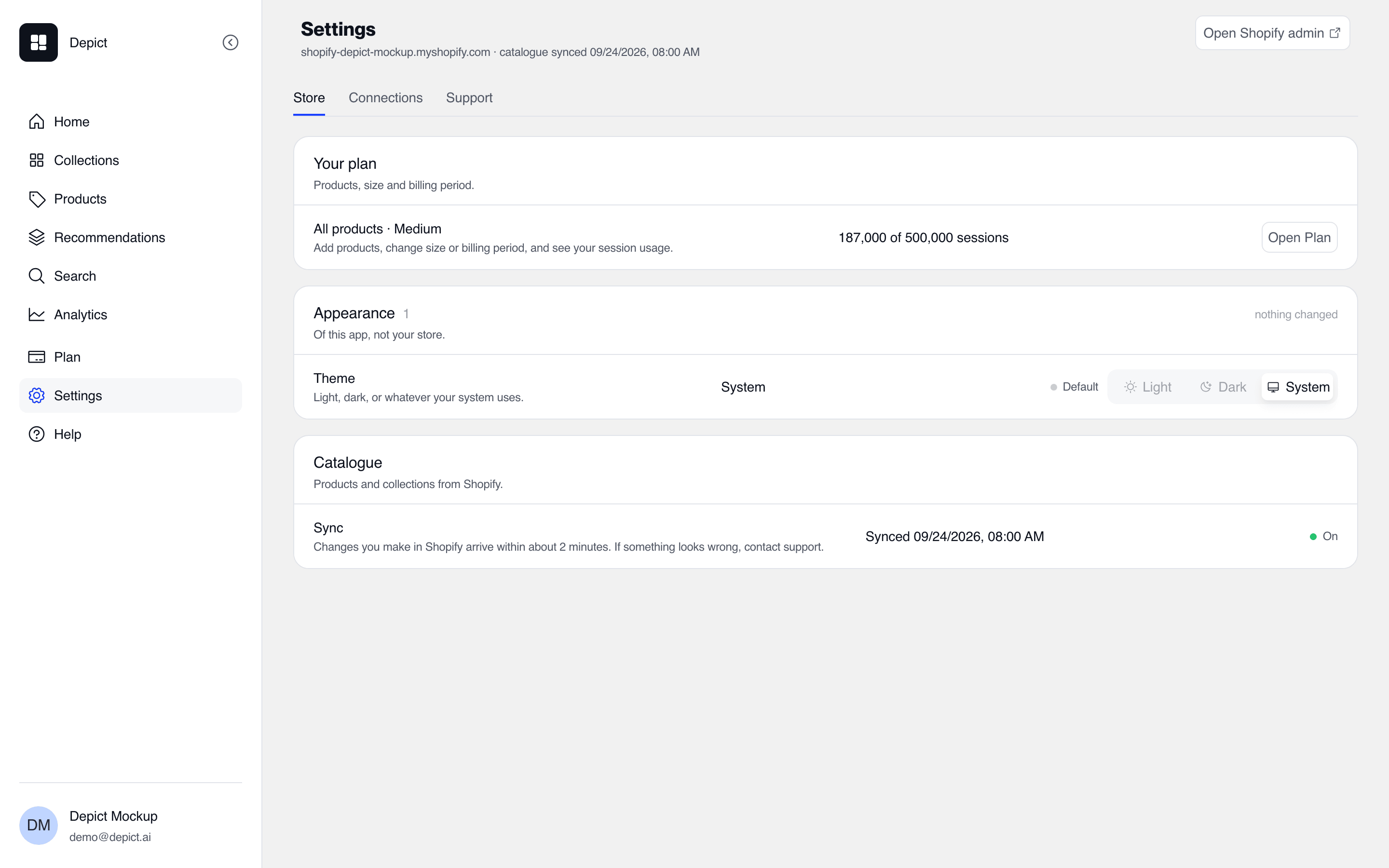
The Settings page on its Store tab: your plan, the app's appearance, and catalog sync.
- Usage — storefront sessions this month against your allowance, the projected total for the month, and when the count resets. On the Free plan it shows live collections against the limit of 3 instead.
- Products — Merchandising, Search and Recommendations, each marked as in your plan, live, or not in your plan, with a button to open or add it. After you add Search or Recommendations, Depict sets it up for you and gets in touch.
- Change plan — pick products, a size and a billing period (monthly or yearly; yearly costs less). The summary shows the price and the session allowance before you confirm.
- Sessions — how sessions are counted: page views from one browser within 30 minutes are one session.
During the Unlimited Trial, everything in Merchandising except multi-store
and collection version A/B tests is available.
Stores on the earlier Basic, Essential, Pro or Custom plans keep them
unchanged until they switch to one of the new plans. They include
Merchandising at the matching size — Basic as Small (50,000 sessions a
month), Essential as Medium (250,000), Pro as Large (500,000) and Custom as
Custom — and the Plan page shows them as a legacy plan.
Appearance
Theme (Light / Dark / System) controls the app’s own appearance, not the storefront.Catalogue
Shows when the catalog was last synced from Shopify. Syncing is automatic: changes you make in Shopify arrive within about 2 minutes. If something looks wrong, contact support.Product badges
On the Settings tab of the Collections page, Product badges defines which products carry the computed badges used by Boost & Bury rules and shown in the editor:
New in has two dropdowns. Define by picks the date that counts:
Published date (the default) uses the date a product was published, or the
date it was created if it was never published; Created date uses the date
it was created. Timeframe sets the number of days. The same date also
decides the order of collections sorted by Newest in or Oldest in.
Collection grid
Also on the Settings tab of the Collections page.- Desktop columns (3–6) and Mobile columns (1–3) set the collection grid’s column counts (defaults: 4 desktop, 2 mobile). These are the column counts used in content-card slot placement.
- Hide sold-out products hides out-of-stock products on every Depict-enabled collection page. Shown only for stores with multiple Shopify markets.
Market groups
Shown in the Markets card on the Store tab, for stores with multiple Shopify markets. Market groups bundle markets that share merchandising and analytics, so a single collection version can target all of them at once.- Create a group with Add Market Group (or Create Market Group when there are none yet): name it and select its markets.
- Each group can be switched on and off.